A SaaS access review is a scheduled check that every person, service account and third party with access to a cloud application still needs it, at the level they hold. You list who has access, ask the people who own the system to keep, change or remove each account, make the changes, and keep proof. This guide shows how to do that in a UK business, how a joiner, mover, leaver process feeds it, and what auditors and regulators expect to see.
TL;DR
- An access review compares who has access with who should have it, then removes the difference and records that it happened.
- Scope by system and account type. Privileged, service and third-party accounts need more attention than ordinary staff logins.
- The ICO expects you to keep records showing access rights are reviewed and adjusted. Weak reviews can contribute to UK GDPR breaches.
- A joiner, mover, leaver process stops most access problems before the review starts. The review catches what the process missed.
- A signed report is not enough. Verify in each application that the change took effect.
Table of Contents
- What a SaaS access review is for
- What UK regulators and standards expect
- Joiner, mover, leaver: the process behind the review
- How to run a SaaS access review, step by step
- How often to review
- Why reviews fail, and how to avoid it
- Our perspective
- Where we can help
- FAQ
- Sources
What a SaaS access review is for
SaaS makes access easy to give and hard to see. Microsoft notes that users can join groups, invite guests, connect to cloud apps and work remotely, and that resource owners should proactively make sure access is regularly reviewed. Microsoft also warns that excessive access rights can lead to compromises and audit findings.
The purpose is simple: align access with least privilege, prevent unauthorized access and support compliance. A user access review is a routine process to make sure employees hold the right permissions for their roles.
In practice, the findings are rarely dramatic. They are a marketing contractor who still has admin rights in the CRM a year after the project ended, a finance analyst who moved teams and kept approval rights, or an old integration account nobody can name. Each is a quiet route for a compromised password to do real damage.
What UK regulators and standards expect
There is no single UK law called “access review”, but several expectations point the same way.
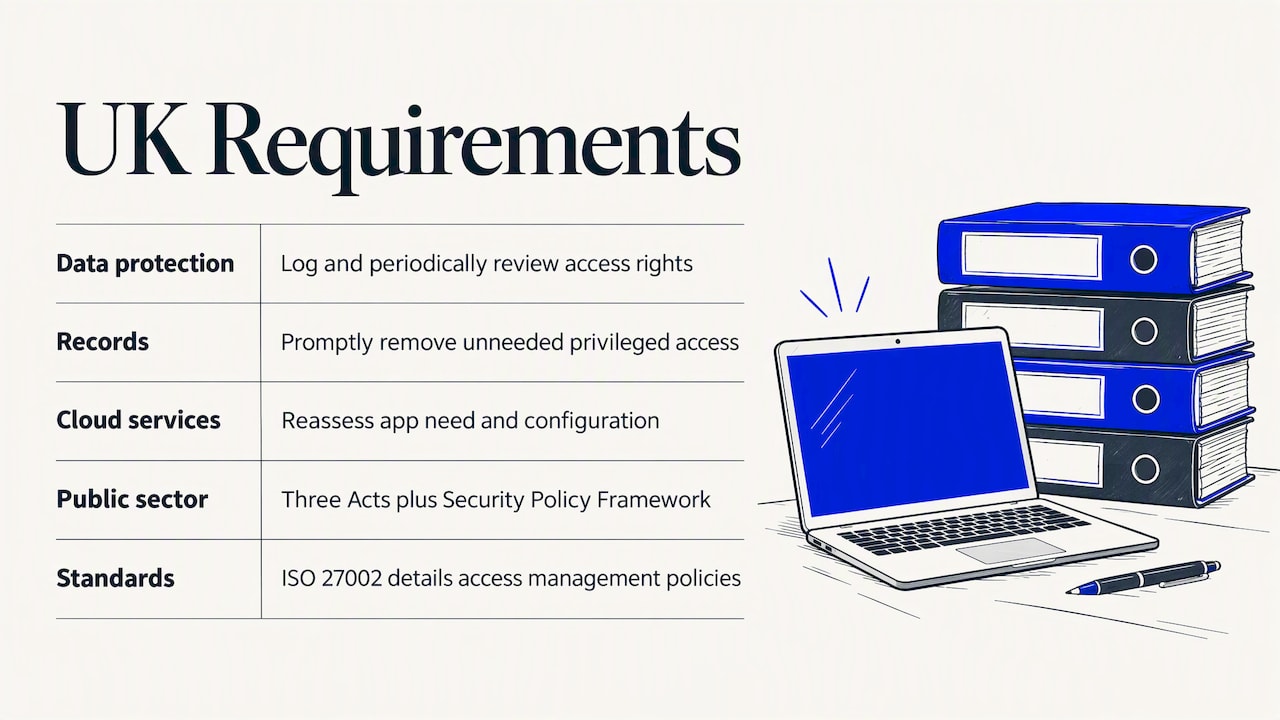
Data protection. The ICO says access rights to electronic records should be logged and periodically reviewed. Failing to do so may breach UK GDPR Articles 5(1)(f), 5(2) and 32. The same ICO guidance recommends a process to remove access or deactivate accounts after a period of inactivity, and end-dates on permissions that are temporary. It also says access management should combine documented policy with appropriate technical solutions.
Records. The ICO’s access control guidance says to promptly remove privileged access when staff no longer need it, and to keep records that demonstrate access rights are reviewed and adjusted when required.
Cloud services. The NCSC treats SaaS governance as continuous. Provider updates can change security features and controls, so you need to periodically reassess both whether you still need an application and how it is configured.
Public sector. Government guidance on securing SaaS tools says they must comply with the Data Protection Act, the Public Records Act, the FOI Act and the Security Policy Framework. If you supply public bodies, expect those requirements to flow down to you.
Standards. The NCSC points out that international standards such as ISO 27002 give detailed identity and access management policies you can follow and be assessed against. If you are working towards certification, our guide to Cyber Essentials, ISO 27001 and SOC 2 shows where access control sits in each, and the ISO 27001 audit requirements article covers what auditors look for before Stage 2.
If personal data is in scope, the ICO’s logging and review expectations apply to any tool that touches it. Our wider view of AI security controls shows how the same discipline extends to newer tools staff adopt without asking.
Joiner, mover, leaver: the process behind the review
A joiner, mover, leaver (JML) process is the way you quickly grant, amend and remove access for new starters, people changing roles and people leaving. The ICO advises organisations to have exactly that, as part of managing electronic records.
The mover step is where most organisations slip. The NCSC notes that when people change jobs it is easy to overlook removing permissions, which can undermine separation of duties. Its advice is to review permissions when employees change jobs or leave.
A workable JML process has five parts:
- A trigger from HR. The start, change or end of employment creates a ticket automatically. Do not rely on a manager remembering to email IT.
- Role-based access bundles. Define the standard set of apps and permissions per role, so a joiner gets a known baseline rather than a copy of a colleague’s account.
- A mover check. When someone changes team, the old role’s access is removed unless a manager justifies keeping it, with an end-date.
- A leaver checklist that covers SaaS. Disabling the directory account does not always reach apps with local logins, API keys or personal-email invitations. List those separately.
- A record of every change. The ICO recommends documenting movers’ and leavers’ processes, checking compliance regularly and keeping records of adjustments and timely removal.
Think of JML as the daily hygiene and the access review as the periodic inspection. The review also measures how well JML works: if every review finds leavers with live accounts, the process has a gap you can name and fix.
How to run a SaaS access review, step by step
1. Define scope and an owner for each population
Start with a list of applications. Rank them by the data they hold and the damage a misuse could do: payroll, finance, source code, customer records and identity platforms come first. Then split the accounts in each application into populations: employees, privileged administrators, service accounts, contractors and guests.
Each population needs a named owner who can judge whether the access makes sense. This is usually the application owner or the line manager, not the security team. Reviewers fail when they cannot understand what they are approving, so describe entitlements in plain language (“can approve payments up to the limit” beats a role code).
2. Pull a dated export from each system
Export the accounts, their roles and their last-login dates, and keep the file with its date. GitLab’s public handbook shows the principle well: document how you pulled the data, for example with dated screenshots of queries, so you can evidence that the user population was complete. An auditor who cannot tell whether the list was full cannot rely on the review.
3. Reconcile with the directory and HR
Match every application account to a real person and a current employment record. Orphaned accounts, shared logins and accounts that sit outside single sign-on surface here. Anything you cannot map to a person goes on the exception list for investigation.
4. Ask owners to decide: keep, change or remove
Give reviewers a simple form per account with three choices. Agree a decision window up front, and chase. Ten working days is a reasonable starting point for most teams, but pick one you can enforce. Silence should not count as approval: unanswered items escalate to a senior manager.
What reviewers should look for:
- Roles that no longer match the job, and permissions that conflict (one person who can both raise and approve a payment).
- Privileged, service and third-party accounts, which deserve a closer look than ordinary users.
- Accounts unused for a long time. Many teams use 90 days of inactivity as a prompt for review, in line with the ICO’s advice to deactivate dormant accounts.
- Temporary access with no end-date.
5. Make the changes
Raise a ticket for each removal or change, with an owner and a deadline. Keep it small and traceable. Bulk changes made in a hurry without a record are hard to defend later.
6. Verify the result in the application
This is the step most reviews skip. Re-export the account list after remediation and confirm the changes took effect. A signed review report only proves the review happened. It does not prove the access was removed, so track remediation separately.
Also check what removal actually does in each app. Deprovisioning an account does not always end active sessions or tokens, so test the revocation behavior of your most sensitive applications rather than assuming it.
7. Close the cycle and keep the evidence
File the lists, the decisions, the tickets and the post-change exports together. For each decision, record who decided, what they decided, who owns the fix, the deadline and the confirmation. That package is what an auditor, an insurer or the ICO would ask to see.
How often to review
No UK rule sets a universal frequency, and ISO 27001 does not mandate one either. The sensible approach is a risk-based rhythm that you can actually sustain and defend. Microsoft’s identity governance tooling supports reviews that recur weekly, monthly, quarterly or annually, and suggests using them for privileged roles, business-critical data, guests and groups given a new purpose.
A pattern we see work for mid-sized organisations:
| Access type | Suggested rhythm | Why |
|---|---|---|
| Privileged and admin accounts | Quarterly | Highest impact if misused |
| Systems with payment, health or client data | Every six months | Regulated data, heavier audit interest |
| Guests, contractors and third parties | Quarterly, plus an end-date | Turnover is high, ownership is unclear |
| Standard staff access | Annually | Lower risk, covered day to day by JML |
| Any account after a role change, merger or incident | Event-driven | Risk changed, so the schedule should too |
This table reflects our practice, not a legal requirement. Do not mix privileged and standard accounts in the same cycle: you either over-review low-risk logins or under-review the dangerous ones. Whatever rhythm you choose, write it into policy and then keep to it. A quarterly promise you miss is worse than an annual review you complete.
Why reviews fail, and how to avoid it
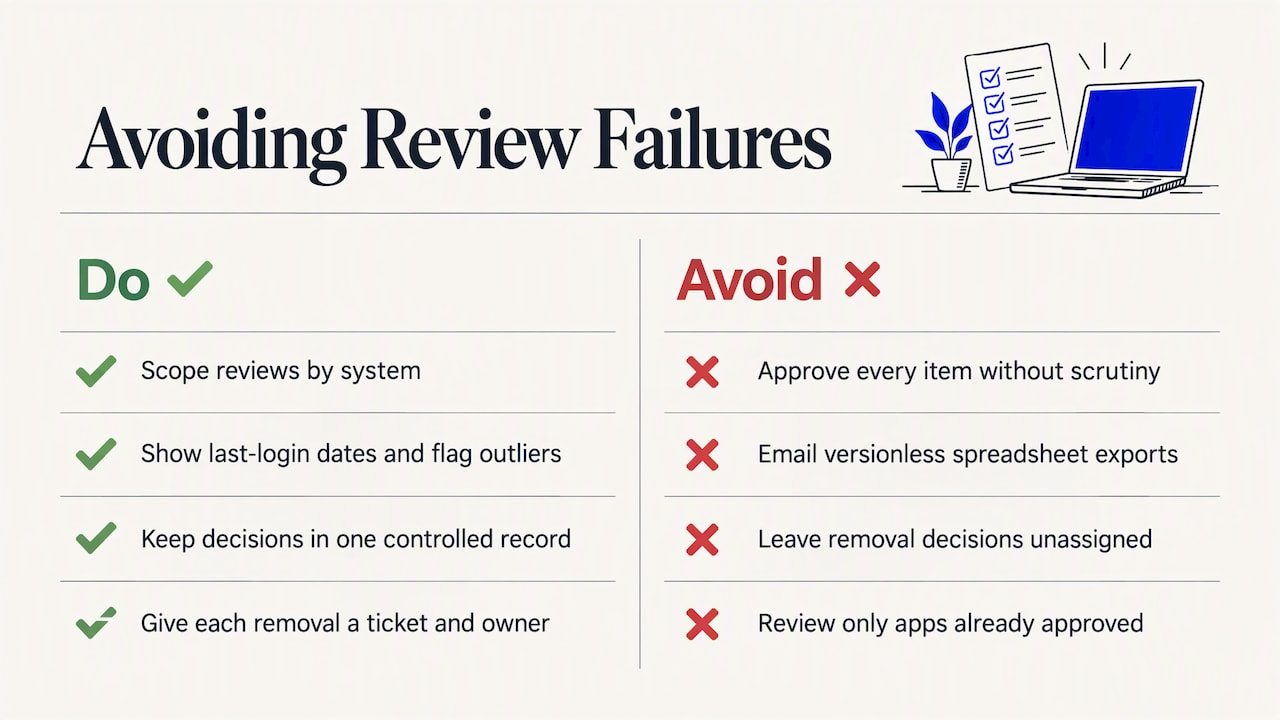
Rubber-stamping. Reviewers approve everything because the list is long and unclear. Shorten lists by scoping by system, show last-login dates, and flag outliers so attention goes where the risk is.
Spreadsheet sprawl. Exports emailed around in files lose version control. Use one place for the decision record, whether that is a governance tool or a controlled shared workbook with locked history.
No owner for the fix. A decision to remove access that nobody actions is a documented risk. Every removal has a ticket and a person.
Hidden SaaS. You cannot review what you do not know exists. Pair reviews with discovery: check single sign-on logs, expense claims and browser-based sign-ups to find apps outside the approved list. The NCSC’s point that you must reassess whether you still need an application is a prompt to retire tools, not just trim their users.
Cloud settings drift. Access is only one control in a SaaS tenancy. Sharing settings, API tokens and integrations matter as well. Our cloud security posture management checklist and the explanation of the cloud shared responsibility model cover what the provider secures and what remains your job.
Our perspective
Most of the access problems we find in multi-location businesses are not technical. They are ownership gaps. A company opens an office, adopts a local tool, and nobody tells the central IT team. Six months later a leaver in that office still has live access to customer data.
So we tell clients to treat the access review as a management report, not an IT chore. The output should be a short list of findings in plain language, an owner for each and a date, not a 4,000-row export. The purpose is structured improvement, not a generic checklist.
We also push for evidence that survives scrutiny. If a regulator, insurer or client asks “how do you know leavers lose access?”, the answer should be a dated export, a ticket and a post-change check, in that order. Anything less is an assertion.
Finally, we would rather you do a smaller review properly than a broad one badly. Start with your identity platform, finance, HR and anything holding client data. Complete one cycle, learn where it hurts, then widen the scope.
— Shirish
Where we can help
If your SaaS estate spans several offices or countries and you want an independent view of who can reach what, our IT security audit examines access control alongside the rest of your environment and gives you a prioritised roadmap in plain terms. For continuous monitoring of sign-in activity and privileged account behavior, our managed SOC services watch for the misuse that periodic reviews can only catch after the fact.

We support finance, healthcare, retail, legal and education organisations, and we scale the engagement to the size of the business. Talk to Zero Through about Global IT Support tailored to your sites and regulators.
FAQ
What is the purpose of an access review?
Its purpose is to confirm that every account still has a business reason to exist and holds no more permission than the role needs. That reduces the chance of unauthorized access, supports least privilege and gives you evidence for audits. It also tests whether your joiner, mover, leaver process works.
Who should carry out a SaaS access review?
The application or system owner, or the line manager of the people concerned, should make the keep, change or remove decision, because they understand the job. The security or IT team sets the scope, supplies the data, chases answers and verifies the changes. Reviewers should not approve their own access.
How long should we keep access review records?
Keep them for as long as your policy, your certification body and your regulators expect, which varies by sector. The ICO’s guidance is that you should be able to demonstrate that access rights are reviewed and adjusted, so retain dated lists, decisions and remediation tickets long enough to cover your audit cycle. Confirm the exact period with your compliance lead or data protection officer.
Is a joiner, mover, leaver process the same as an access review?
No. A JML process handles access at the moment a person’s employment changes, while an access review checks the whole estate on a schedule. You need both: JML prevents most problems, and the review finds what slipped through, such as accounts created outside the process.
Sources
- Access | ICO
- Access control | ICO
- What are access reviews? | Microsoft Entra
- Using Software as a Service (SaaS) securely | NCSC
- Securing SaaS tools for your organisation | GOV.UK
- Introduction to identity and access management | NCSC
- Protecting bulk personal data | NCSC
- Access Review Procedure | The GitLab Handbook
- User Access Review: Definition, Process and Best Practices | Ping Identity