For most UK businesses the answer is both, for a while. Passkeys are the stronger way to sign in and should replace passwords wherever a service supports them. Passwords will still be needed for legacy systems and suppliers that cannot yet accept passkeys. The real decision is where to start, how to handle lost devices, and how to protect the passwords you keep.
This guide compares the two on how they work, how they fail, and what they cost you in day-to-day support. It then sets out a rollout order that suits a company with several offices, mixed devices and regulated data.
TL;DR
- A password is a shared secret you remember and type. A passkey is a cryptographic key pair: the private key stays on your device and never crosses the network.
- The UK’s National Cyber Security Centre (NCSC) recommends passkeys over passwords wherever they are available, because they resist phishing and cannot be intercepted, reused or stolen.
- Passkeys are not a finished fix. Support is inconsistent, recovery is a new attack surface, and on-premises Active Directory and many legacy apps cannot use them.
- Plan a hybrid period: passkeys first for admin, finance and sensitive-data accounts, strong password plus two-step verification (2SV) everywhere else.
- Write the recovery process before you switch anything on.
Table of Contents
- How passwords and passkeys each prove who you are
- Security compared: phishing, theft and breaches
- The disadvantages of passkeys for a business
- Can staff still use a password once a passkey is set up?
- Why organizations move, and why many stall
- A rollout order that works for multi-site businesses
- Our perspective
- Getting the identity layer monitored and tested
- FAQ
- Sources
How passwords and passkeys each prove who you are
A password is something a person creates and remembers. The service stores a version of it, and the user sends the secret each time they sign in. That is the weakness: anything you can type, an attacker can trick you into typing on a fake page, or find in a breached database if it was reused.
A passkey works differently. It uses public-key cryptography: a public and private key pair is bound to your account on a website. The authenticator (your phone, laptop or security key) holds the private key, and the website’s server holds only the public key. Signing in means proving you hold the private key, without ever sending it.
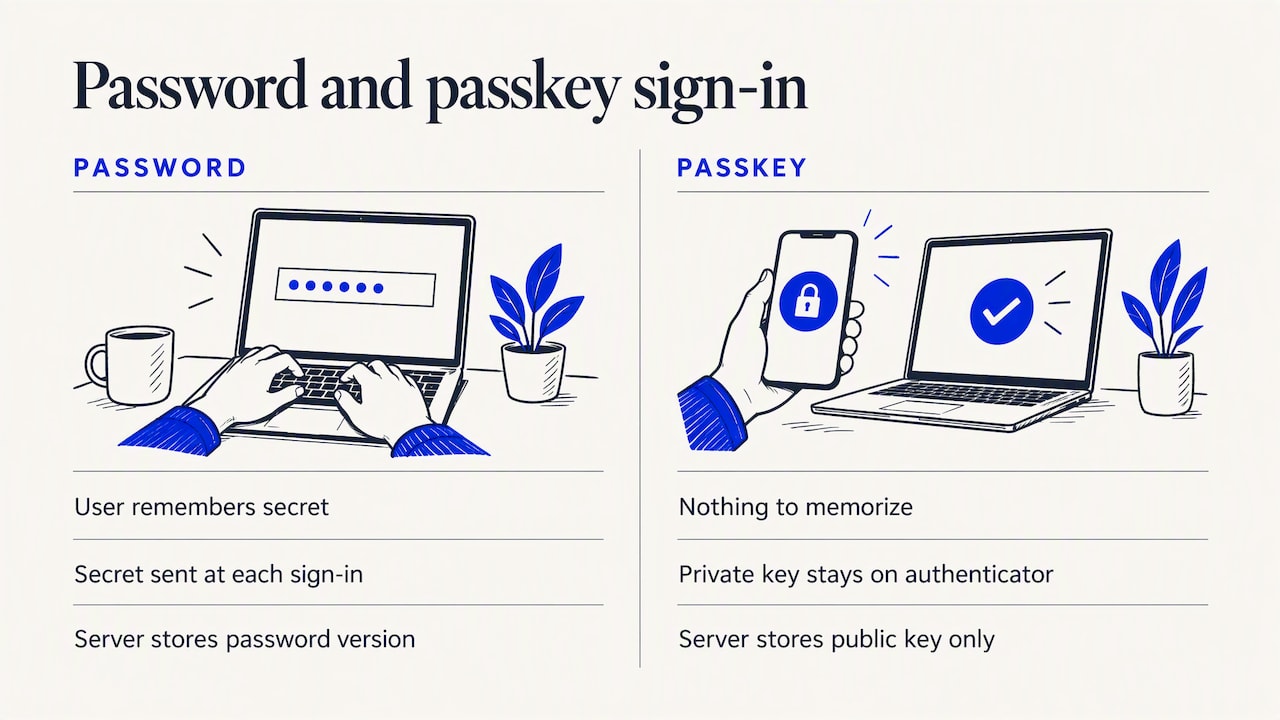
There is nothing for the user to memorize, nothing to reuse across sites, and nothing on the server that is useful to a thief on its own.
What signing in with a passkey looks like
For an employee, it is short. They open the site or app, choose their passkey, and unlock their device with a biometric, PIN or pattern. That local unlock is not sent to the service. It only releases the private key on the device.
Security compared: phishing, theft and breaches
The NCSC says passkeys are more secure than traditional ways to log in. Its reasoning is that traditional multi-factor authentication can still be phished, whereas a passkey binds the sign-in to the legitimate service. That stops cheap credential reuse and relay attacks. The NCSC’s CTO for Architecture, Dave Chismon, notes that even with an imperfect implementation, passkeys beat the best-implemented traditional MFA against the common credential attacks seen in the wild.
The NCSC’s public guidance goes further: it recommends choosing passkeys over passwords where available and assesses them as at least as secure as 2SV with the strongest password.
| Threat | Password | Password + 2SV code | Passkey |
|---|---|---|---|
| Fake login page | Credential handed over | Password and code can both be relayed | Sign-in tied to the real service, so the fake page gets nothing useful |
| Reuse across sites | Common | Common | Not possible: each key pair is unique to a service |
| Server database breach | Stored hashes can be cracked | Same | Server holds only public keys |
| Guessing and brute force | Possible | Harder | Not applicable |
| Lost or stolen device | Not relevant | Phone may hold the codes | Needs a device unlock, and recovery must be planned |
| Attack on account recovery | Possible | Possible | Possible, and now the main target |
The table shows the pattern: passkeys remove the attacks that cause most account takeovers, and leave attackers with the edges. Those edges are where your effort should go.
What passkeys do not fix
Delinea’s SVP International, Spencer Young, told Computing that passkeys reduce phishing and credential-theft risk but do not eliminate identity risk. The risk moves to devices, recovery processes and the platforms that manage identities.
SpecterOps CTO Jared Atkinson makes a sharper point in the same piece: if an attacker can register an extra passkey on an account, they may keep long-term access. So a business needs to control who can add or remove authenticators, and monitor those changes. That is a detection job, and it is the kind of event a SOC or SIEM should be watching for.
The disadvantages of passkeys for a business
The NCSC is candid that passkeys are not perfect. For UK businesses, its guidance points to these limits:
- Inconsistent support. Device-bound, physical-token and synchronized passkeys differ, and a website may accept some types but not others. That makes the user experience confusing and complicates how much assurance you can take from a given passkey.
- Device loss. A lost or broken phone needs a prepared recovery route, and users should set up their credential manager account for recovery in advance.
- Moving between credential managers. Switching ecosystems is still hard.
- Recovery as an attack target. If recovery is weaker than the passkey, attackers will use recovery.
- Poor fit for some people. Shared devices, staff without their own modern device, and users whose biometrics work badly all need another route.
Vendor commentary adds practical friction. Kaspersky UK has listed obstacles such as legacy or isolated systems, passkeys fragmented across Apple, Google and Microsoft ecosystems, personal devices, Bluetooth restrictions, the cost of physical tokens, and new onboarding and offboarding policies. Treat it as a checklist of questions to ask about your estate, not as independent guidance.
Computing also reports that on-premises Active Directory and many legacy enterprise applications do not support passkeys. A long hybrid period therefore limits how quickly helpdesk reset volumes and one-time-code support will fall. Do not promise your finance director an immediate drop in tickets.
Can staff still use a password once a passkey is set up?
Often yes, and in the near term you will want that. Where passkeys are unavailable, the NCSC advises strong passwords, such as ones generated by a password manager, plus 2SV.
Businesses should expect to run a mix. Advice reported by SC Media UK is that not every application or supplier supports passkeys yet, so enterprises should keep a hybrid authentication environment during the transition.
The risk of a hybrid setup is that the password stays as an easy back door. If a passkey-protected account can still be opened with a password and an SMS code, an attacker will simply pick that route. Once your people are comfortable, remove the weaker methods from accounts that matter most, in line with what each application allows.
Why organizations move, and why many stall
A multi-country survey reported by Yahoo Tech found that organizations that made passkeys their primary sign-in method cited protection against phishing and MFA fatigue (39%) and modernizing digital infrastructure (36%). The same report quotes Rob Pegoraro saying organizational inertia is holding adoption back despite high consumer awareness.
That matches what we see. Staff already use passkeys on personal accounts, so the interest is there. What is missing is an owner, a recovery process and a priority list.
A rollout order that works for multi-site businesses
UK-focused guidance on business rollouts suggests a gradual migration that starts with high-risk accounts and a pilot group. Microsoft’s own guidance for organizations follows a similar sequence: assess current password practices, security needs and compliance requirements, choose a compatible and scalable solution, define policies, deploy and test integration, then train employees.
Here is how we would turn that into steps:
- Inventory your sign-ins. List every application, supplier portal and system, and mark which accept passkeys, which accept only passwords and MFA, and which are on-premises.
- Pick the first group. Administrators, finance staff and anyone with access to sensitive or regulated data. These accounts are the ones attackers target and the ones where phishing resistance pays back fastest.
- Run a pilot. Use a small group across more than one office and device type. Collect pain points and refine policy before you widen it.
- Write the recovery playbook. It should cover lost devices, how identity is verified and who approves re-enrollment. The NCSC advises preparing users for device loss or breakage, and a written playbook means the helpdesk is not improvising under pressure.
- Control and log authenticator changes. Decide who can add or remove passkeys, and alert on additions, especially from new locations.
- Harden what remains. For systems still on passwords, enforce manager-generated passwords and 2SV, and test staff against phishing.
- Retire weak fallbacks. As coverage grows, remove passwords and SMS codes from the accounts that no longer need them.
If you operate in several jurisdictions, check each location’s rules on biometrics and device ownership with your legal and HR teams before enforcing a policy. Our guide to phishing tactics for international business teams covers the attacks that will keep targeting recovery and fallback routes, and our piece on endpoint security for a remote workforce covers the devices that now hold your keys.
Our perspective
We do not treat passkeys as a product to buy. They are one control within an identity program, and they are only as strong as the process around them.
In our experience across multi-location organizations, trouble rarely comes from the cryptography. It comes from the gaps: an office that still uses a shared workstation, a supplier portal that only takes passwords, a helpdesk that resets access after a convincing phone call. A passkey on the front door does not help if recovery is a side window left open.
So we advise clients to do three things together. Adopt passkeys for the accounts that would hurt most if lost. Harden recovery and treat authenticator registration as a security event worth monitoring. And test the result, through an IT security audit of your identity setup and, where it fits, a penetration test that tries social engineering against your recovery steps.
The point is a structured improvement you can explain to your board, not a checklist that looks good and fails the first real attempt.
— Shirish
Getting the identity layer monitored and tested
Moving to passkeys changes what attackers aim at, so your visibility has to follow. Zero Through provides managed SOC services and managed SIEM services that can watch for events such as new authenticators being registered or unusual sign-in patterns. We also run penetration testing against the weak points that remain. If you are planning a rollout across several sites, our global IT support team can scale with you as you add offices and users. For wider context, see our practical guide to UK cyber security.
FAQ
What are the disadvantages of passkeys?
Support is still uneven across websites, devices and credential managers, and moving between managers is difficult. Lost devices need a prepared recovery route, and attackers may target the recovery process instead. Shared devices and staff without a suitable device or working biometrics need an alternative.
Should I use passkeys instead of passwords?
Yes, wherever a service offers them. The NCSC recommends passkeys over passwords where available. Where they are not, use a strong, unique password from a password manager and turn on 2SV.
What is an example of a passkey?
It is the sign-in you complete by choosing a saved passkey on a site or app and then unlocking your phone or laptop with a fingerprint, face scan, PIN or pattern. The private key stays on your device or in your credential manager. The website holds only the matching public key.
Can I still use my password if I have a passkey?
Usually, yes, because most services keep the password as a fallback. That is useful during a transition but it is also a weak point. For important accounts, remove or tighten the fallback once your passkey and recovery arrangements are working.
Sources
- Passkeys – Security | MDN
- Passkeys | Google for Developers
- Passkeys are more secure than traditional ways to log in | NCSC
- Passkeys: what you need to know | NCSC
- Passkeys: they’re not perfect but they’re getting better | NCSC
- Are passkeys ready for the enterprise? A qualified yes | Computing
- Are passkeys enterprise-ready? | Kaspersky
- The NCSC Wants You To Adopt Passkeys | SC Media UK
- Passkey-Adoption Report | Yahoo Tech
- Passkeys v passwords | SME Cyber Insights
- What is a Passkey? | Microsoft Security