When a company laptop goes missing, treat it as a security incident from the first minute, not as a hardware problem. Report it internally straight away, cut off the accounts that laptop could reach, lock or wipe the device if you can, and work out whether personal data was on it. If it was and the disk was not encrypted, you may have a UK GDPR breach with a 72-hour clock already running.
This guide is written for the people who have to make those calls: owners, operations leads and IT or compliance managers at UK businesses with staff in more than one place. It covers the first hours, the legal reporting question, what to tell employees, and the controls that turn a lost laptop into a minor event.
TL;DR
- Report the loss to IT the moment it is noticed, then revoke sessions and passwords before you try a remote wipe.
- The ICO’s 72-hour reporting window starts when you become aware of the breach, not when the laptop actually disappeared.
- An unencrypted laptop is the difference between a logged incident and a reportable breach, because you cannot prove nobody read the data.
- Full-disk encryption, device management with remote wipe, and MFA on every cloud service decide how bad the loss is before it happens.
- Write the playbook now. Nobody makes good decisions about a stolen laptop at 6 p.m. on a Friday with no plan.
Table of Contents
- The first two hours: what to do, in order
- Is it a reportable data breach?
- Telling your own people
- Can you track the laptop?
- What makes a lost laptop harmless
- Our perspective
- Write the playbook before you need it
- How we help
- FAQ
- Sources
The first two hours: what to do, in order
The order matters more than speed on any single step. A practical SMB checklist for lost laptops and phones makes the same point: the first two hours decide whether this stays an annoying inconvenience or becomes a reportable breach.
1. Get the facts and tell IT
Ask the employee for the basics, without blame. When and where was the laptop last seen? Was it locked, shut down or asleep? Was it left in a car, a train, a hotel, a home? Which accounts were signed in? Was anything sensitive stored locally, such as client files, exports from a finance system or a cached mailbox?
Blame is the enemy of speed. If staff fear discipline, they wait a day and hope the laptop turns up. Your policy should make prompt reporting safe.
2. Revoke access before you wipe
This is the step people skip. A remote wipe command only runs when the device connects to the internet, and a thief who knows what they are doing will keep it offline. Forcing sign-out of all active sessions in Microsoft 365 or Google Workspace, and resetting the user’s credentials, cuts off cloud access even if the physical device is never wiped.
In practice:
- Reset the user’s password and revoke all refresh tokens and active sessions.
- Remove or re-register the user’s MFA methods if the laptop or a linked phone was lost together.
- Revoke any VPN certificates, API keys, SSH keys or saved credentials that lived on the device.
- Check password managers and browser sync: a signed-in browser profile can hold years of saved logins.
- Disable the device record in your identity provider so it can no longer be treated as trusted.
3. Lock, then wipe
If the laptop is enrolled in mobile device management (MDM), send a lock command first, then a wipe. Be realistic about the limits. Remote wipe is only effective if the device is switched on and online, so queue the command and leave it pending: the moment the laptop connects, it runs. Keep the device record until you see confirmation.
If the device is not enrolled in MDM, you have no remote option. Everything then rests on encryption and on the account revocation in step 2.
4. Check the logs
Look at sign-in logs for the user and the device from the time of loss onward. Unfamiliar locations, failed MFA prompts, new device registrations and mailbox rule changes all matter. A managed detection service watching these signals can spot a thief probing the account long before you do. We return to that in the promo section below.
5. Report to the police and your insurer
A crime reference number helps with insurance and shows the loss was taken seriously. Check your policy: some insurers set strict notification windows, and a late claim can be refused. Keep the loss date, the reference number and the serial number together in one incident record.
Is it a reportable data breach?
A lost laptop is a personal data breach if it holds personal data and the confidentiality of that data is at risk. The Information Commissioner’s Office (ICO) is clear on the deadline: you must report a notifiable breach within 72 hours of becoming aware of it, and if you take longer you must give reasons for the delay. You can report in stages if you do not yet have every detail.
Two points catch businesses out.
The clock starts at awareness. It does not start when the laptop was actually lost. If an employee mentions on Monday that the bag went missing on Friday, your 72 hours begin Monday, but you will need to explain why the loss was not escalated sooner.
Encryption changes the answer. If the laptop was unencrypted, you cannot demonstrate that nobody accessed the data, which makes it a potentially high-risk breach that has to be logged and often reported, as summarized in this guide to UK breach reporting. The ICO’s own personal data breach examples include an employee who lost a briefcase holding an unencrypted laptop and paper files on a sensitive court case, with criminal conviction and health information involved. That is the pattern regulators worry about.
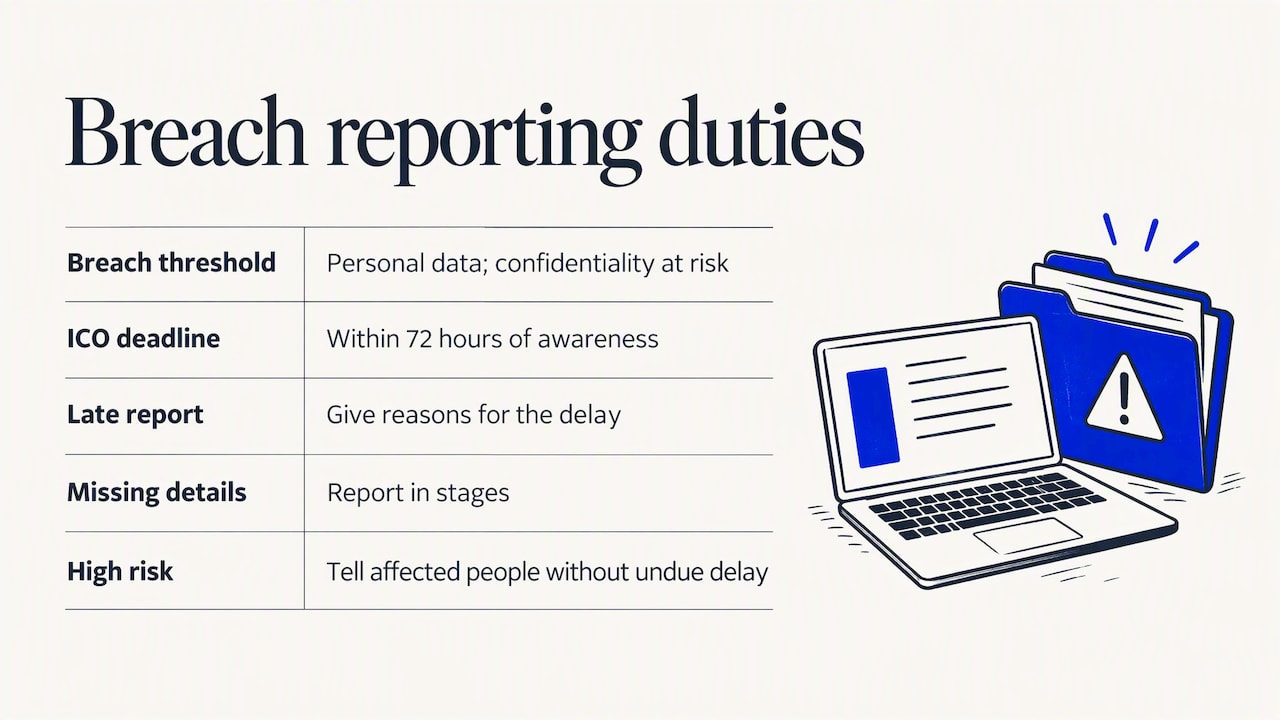
If the breach is likely to result in a high risk to the people affected, you must also tell them without undue delay. Even when you decide a breach is not reportable, record the incident and your reasoning. The decision is yours to defend later.
A quick decision table
| Situation | Likely position | What to do |
|---|---|---|
| Encrypted disk, strong boot authentication, no personal data held locally | Low risk; unlikely to be notifiable | Log it, revoke access, document the reasoning |
| Encrypted disk, but the laptop was unlocked or asleep when taken | Treat as higher risk until proven otherwise | Revoke sessions at once, assess what was open, consider reporting |
| Unencrypted disk with client or staff personal data | Potentially high risk | Assess within hours, report to the ICO within 72 hours of awareness, consider telling individuals |
| Unencrypted disk holding special category data (health, criminal records) | High risk | Report, notify affected individuals, involve legal counsel |
This table is a starting point for triage, not legal advice. If you are unsure whether a loss is notifiable, speak to your data protection officer or a UK data protection solicitor the same day. If you operate across several countries, other regulators may have their own deadlines, which our guide to data protection laws for multinationals covers.
Telling your own people
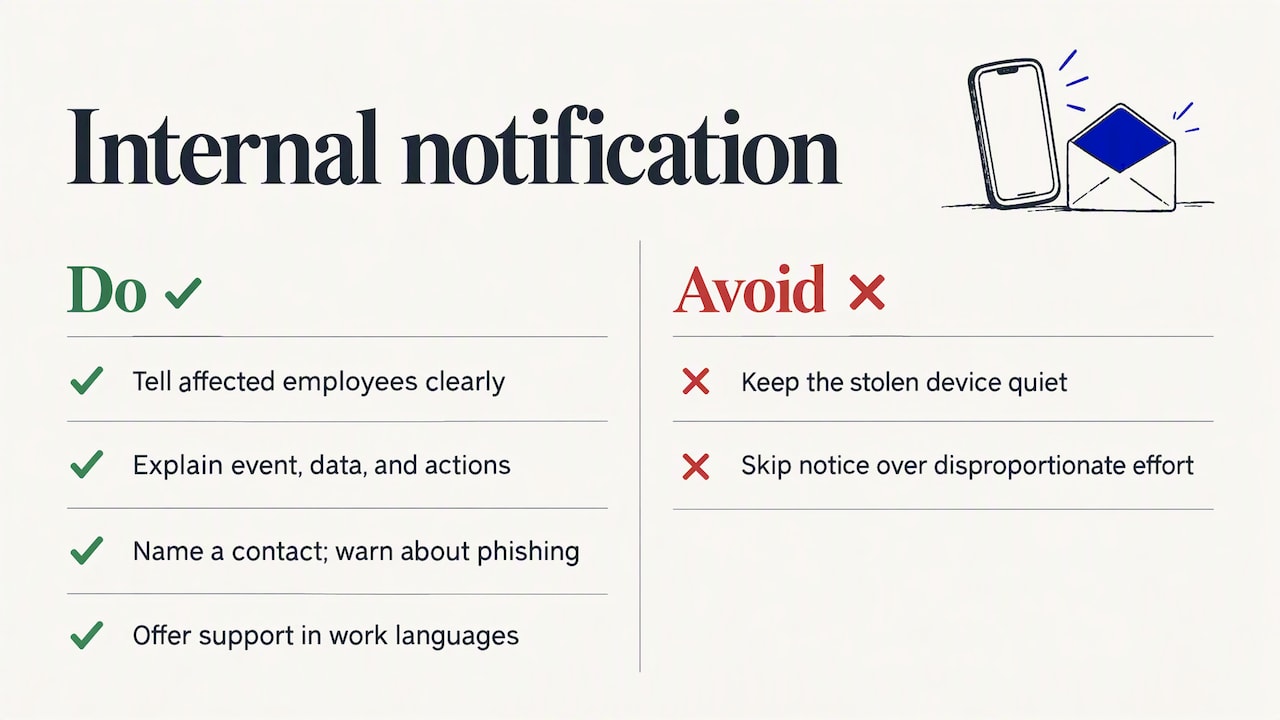
It is tempting to keep a stolen device quiet to avoid fuss. Resist it. Legal advisers note that the law expects transparency, and that “disproportionate effort” is rarely a valid reason to skip telling people. If employee data was on the laptop, those employees need a clear message and a named contact.
A good internal notice says what happened, what data may be affected, what you have already done, what the person should do (for example watch for phishing aimed at them) and who to call. For firms with staff in several countries, offering the support channel in the languages people actually work in is part of the response, not an extra.
Expect phishing to follow. Attackers who obtain a name list and email addresses often use them. Our piece on phishing tactics for international business teams explains what that looks like.
Can you track the laptop?
Sometimes. Location tools built into the operating system or MDM platform can show where a device last connected, and some endpoint agents can survive a reinstall. But treat tracking as a bonus, not a plan. Do not send an employee to retrieve a device from an address on a map. Pass the location to the police.
Keep monitoring proportionate. In the UK, employers may monitor company-issued laptops for legitimate business reasons if staff have been told and the rules sit in a written acceptable use policy. Capturing webcam footage or keystroke rhythm is generally considered highly intrusive and hard to justify, so do not switch on invasive features just because a laptop is missing. Document the decision, ideally through a data protection impact assessment.
What makes a lost laptop harmless
The laptop that cannot hurt you shares four traits. All of them are set up long before anyone loses anything.
Full-disk encryption with real boot protection
The National Cyber Security Centre recommends full-disk encryption with BitLocker on Windows to protect data at rest, and describes TPM plus a PIN as the most secure configuration because it requires authentication at boot. On a Mac, the equivalent is FileVault. Both are built in. The job is to verify they are on for every device, not assume it.
Device management you can prove
If you cannot list every laptop, who has it, whether it is encrypted and when it last checked in, you cannot answer the first question a regulator or client asks. A device outside MDM or without encryption is a major vulnerability, particularly for businesses with staff spread across locations. Inventory is boring until the day it saves you.
MFA on every cloud service
MFA means a stolen password alone does not unlock email, file storage or finance systems. Pair it with conditional access so that only managed, compliant devices can reach sensitive data. That turns the lost laptop’s saved sessions into a short-lived problem.
Less data on the device
The safest data on a stolen laptop is none. Keep files in managed cloud storage, use separate work profiles, and apply least privilege so one person’s laptop never holds the whole client base. Our article on data loss prevention across locations goes deeper, and endpoint security for a global remote workforce covers the wider device picture.
Our perspective
In our experience, a lost laptop is rarely the real story. It is a stress test of governance. Businesses that cope well did the dull work earlier: a device inventory, encryption enforced by policy rather than by request, and an incident procedure someone has actually read.
Businesses that struggle often cannot tell a minor incident from a company-wide compromise until it is too late, because nothing central shows what was on the device or what it could reach. Legal specialists make the same observation: effective breach response relies on a pre-defined playbook rather than ad-hoc decisions, and tested procedures beat hoping encryption holds.
We also push back on the idea that managing the device makes you safe. Monitoring and MDM are half the job. A compromised employee can still leak data from a perfectly managed laptop, which is why least privilege and technical segregation, alongside awareness training, reduce risk more than another tool. Our approach is to explain findings in plain language and hand clients a roadmap they can work through in order, not a generic checklist.
— Shirish
Write the playbook before you need it
A workable lost-device procedure fits on two pages. Include:
- A single reporting route. One phone number and one email that work out of hours, known to every employee.
- Named owners. Who decides whether to report to the ICO? Who speaks to staff? Who talks to the insurer and the police?
- A technical runbook. Session revocation, credential reset, lock and wipe commands, log review, in that order, with the admin console paths written down.
- A breach assessment template. What data, how many people, was it encrypted, what is the risk, what did we decide and why.
- A clock. Record the time of awareness so the 72 hours is never a guess.
- A rehearsal. Run a tabletop exercise once a year with a fictional lost laptop. It exposes gaps faster than any audit.
The same discipline applies to bigger events. If you want to understand where a lost-device plan ends and wider response begins, see incident response versus disaster recovery.
Policy points that prevent repeat losses
- No devices left in parked cars, and a rule on travel and hotel storage.
- Screen lock after a short idle time, and shutdown rather than sleep when traveling.
- No local storage of regulated data unless approved and encrypted.
- A leaver process that recovers devices and removes access on the last day.
- Privacy screens and cable locks for staff who work in public places.
How we help
For multi-location businesses, lost devices are one case of a bigger question: can you see and control what is happening across every endpoint and account? We provide global IT support built around security, with managed SOC services and MDR watching for suspicious sign-ins after a device goes missing. If you are not sure how exposed your current setup is, an IT security audit shows which laptops are unencrypted or unmanaged and what a thief could reach, with a prioritized plan to fix it. For regulated sectors such as financial services, healthcare and law, where one missing laptop can trigger client and regulator questions, that evidence is what you will want to hand over.
FAQ
What happens if my work laptop is stolen?
Tell your IT team or manager immediately, even if it happened late at night. They will revoke your sessions, reset your passwords, and lock or wipe the device if it is managed. Your employer then decides whether it is a reportable data breach, which is why a fast and honest report protects you as well as the business.
Can a company see my laptop?
Often, yes. In the UK an employer may monitor company-issued equipment for legitimate business reasons if staff have been told and there is a written policy. Monitoring should be proportionate and transparent, and highly intrusive measures such as webcam capture are hard to justify.
Do we have to report a lost laptop to the ICO?
Not always, but you must assess it quickly. If the laptop held personal data and the loss is likely to risk people’s rights and freedoms, you must report to the ICO within 72 hours of becoming aware. An unencrypted device makes reporting much more likely, because you cannot show the data was not accessed. Record your decision either way.
Is a remote wipe enough?
No. A wipe only runs once the device is powered on and online, and a thief may never connect it. Revoke sessions and credentials first so cloud data is protected regardless, then queue the wipe.
Should the employee pay for a lost laptop?
That depends on the employment contract, your policy and the circumstances, so take advice from HR or an employment adviser before deducting anything. From a security view, penalizing prompt reporting tends to make staff hide losses, which costs far more than a laptop.
Sources
- Personal data breaches: a guide, ICO
- Personal data breach examples, ICO
- Device security guidance for Windows, NCSC
- Lost laptop or phone: SMB checklist
- UK Data Breach Reporting: The 72-Hour ICO Rule
- UK employee monitoring laws: FAQs for employers
- Breach and tell: what to do when you discover a personal data breach, Make UK
- Cyber team helps retrieve stolen data, Clyde & Co
- Monitoring at work draft guidance, Addleshaw Goddard