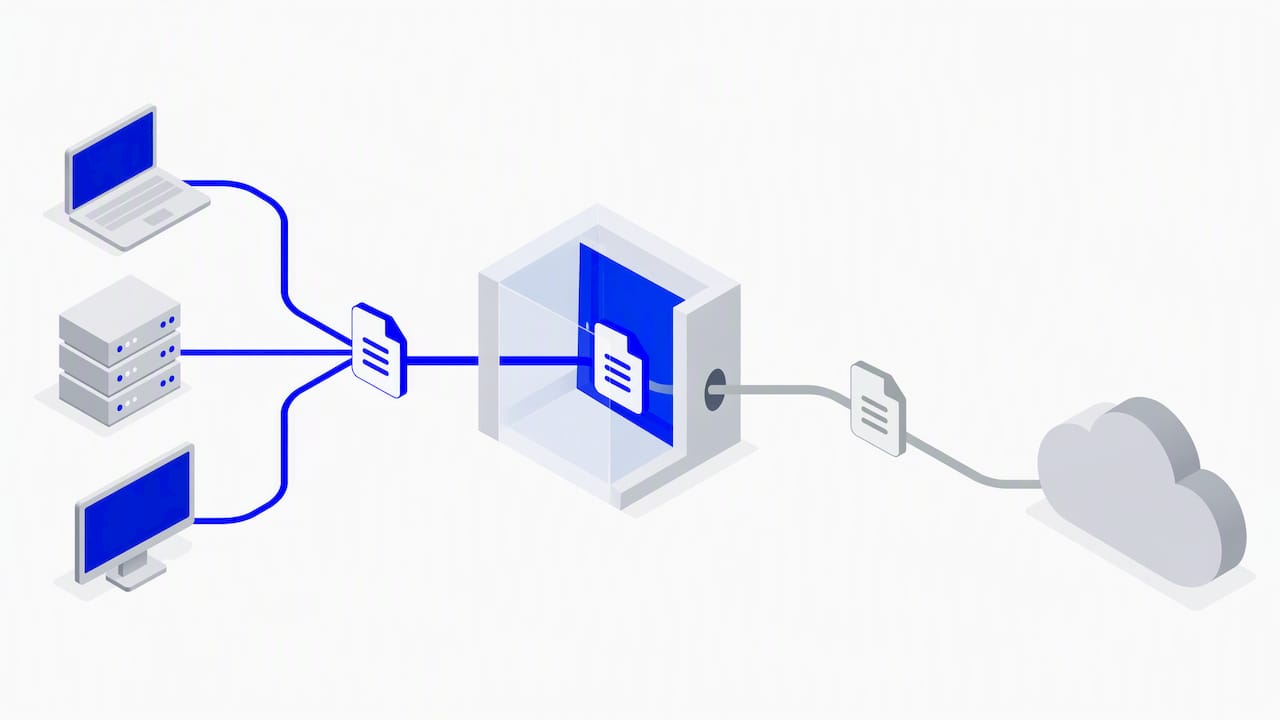
Data loss prevention (DLP) identifies, monitors and controls sensitive data across its three states: in use, in motion and at rest. Done well, it stops exfiltration, supports compliance with rules such as GDPR, and cuts insider and accidental risk. NCSC guidance treats it as one layer in a wider defense. At Zero Through, we help teams run it as a sustained program.

TL;DR:
- Discover and classify sensitive data first, monitor passively for several weeks, then refine noisy rules and enforce them in phases on the highest risk assets.
- Network DLP catches traffic crossing gateways, endpoint agents protect devices away from the office, and cloud controls scan storage; coverage depends on deployed agents.
- DLP loses visibility once files leave controlled paths, so pair it with digital rights management when recipients must remain bound by usage restrictions.
- Assign technical operations to security teams and sensitivity decisions to data owners, then track response time, agent coverage, and false alarm rates.
- Keep monitoring proportionate: notify staff about its purpose, and focus the strictest scrutiny on high risk users and critical assets, not everyone.
Table of Contents
- What is data loss prevention and why do organizations need it?
- How does DLP detect and enforce protections?
- What types of DLP solutions exist and where does each fit?
- When does DLP work well, and where should you expect gaps?
- How do you design and govern a DLP program?
- Which technical controls should you pair with DLP?
- How should you deploy and tune DLP step by step?
- How do GDPR and proportionate monitoring affect DLP?
- What does a managed-services view add to DLP?
- How can Zero Through help you run DLP-aligned controls?
- FAQ
- Sources
What is data loss prevention and why do organizations need it?
NIST’s glossary defines DLP as the ability to identify, monitor, and protect data in use, in motion and at rest, using deep content inspection and contextual transaction analysis within a centralized management framework. In plain terms, DLP watches where sensitive information lives, who touches it and where it tries to go.
The business case is simple. A leak of customer records, source code or financial plans can mean regulatory fines, lost intellectual property and lasting reputational damage. Regulators also expect you to show your work. The GDPR security principle requires appropriate technical and organizational measures to protect personal data, and guidance on security outcomes adds that you must be able to demonstrate accountability, not just claim it.
Most data loss comes from a handful of causes:
- Human error: the wrong recipient on an email, a spreadsheet shared with a public link, a laptop left on a train.
- Insider exfiltration: a departing employee copying client lists to a personal drive or USB stick.
- Malware: credential stealers and ransomware crews that copy data out before they encrypt anything.
- Device theft or loss: unencrypted phones, laptops and removable media.
These causes behave differently, which is why one control rarely covers all of them. A mistyped email address needs a prompt at send time. A malicious insider needs monitoring and access limits. Malware needs detection on the network and the endpoint. DLP gives you the policy layer that ties those responses together, and the rest of this guide shows how the pieces fit.
How does DLP detect and enforce protections?
DLP works in two steps: decide whether data is sensitive, then decide what to do about it.
Content inspection
Content inspection looks inside files and messages. Common methods include:
- Pattern matching and regular expressions: catching formats such as payment card numbers or national insurance numbers.
- Exact data matching: comparing outgoing content against a hashed copy of real records, which cuts false alarms.
- Fingerprinting: recognizing documents, or fragments of them, that you have registered as sensitive.
- Optical character recognition (OCR): reading text inside screenshots and scanned images that plain text scanning would miss.
Contextual analysis
Context answers the questions content cannot. Who is sending this, and what are their privileges? Who is receiving it? Which channel is being used, and at what time? A finance analyst emailing a payroll file to a colleague during normal working hours looks very different from the same file going to a personal webmail address late at night.
Enforcement actions
When a policy fires, the usual responses run from soft to hard. The system can alert the user, log the event for review, quarantine the item pending approval, or block the transfer outright. A sensible workflow sends quarantined items to a reviewer with the business context in hand, so a legitimate transfer gets released quickly and a suspicious one escalates to incident response.
Where visibility stops
DLP has limits you should plan around. Encrypted content cannot be inspected unless the tool sits at a point where it can see plaintext, and a determined person can hide data with techniques such as steganography. The biggest limit is the point of control: DLP only governs the paths you operate. Once a file leaves those paths, your policies stop travelling with it.
What types of DLP solutions exist and where does each fit?
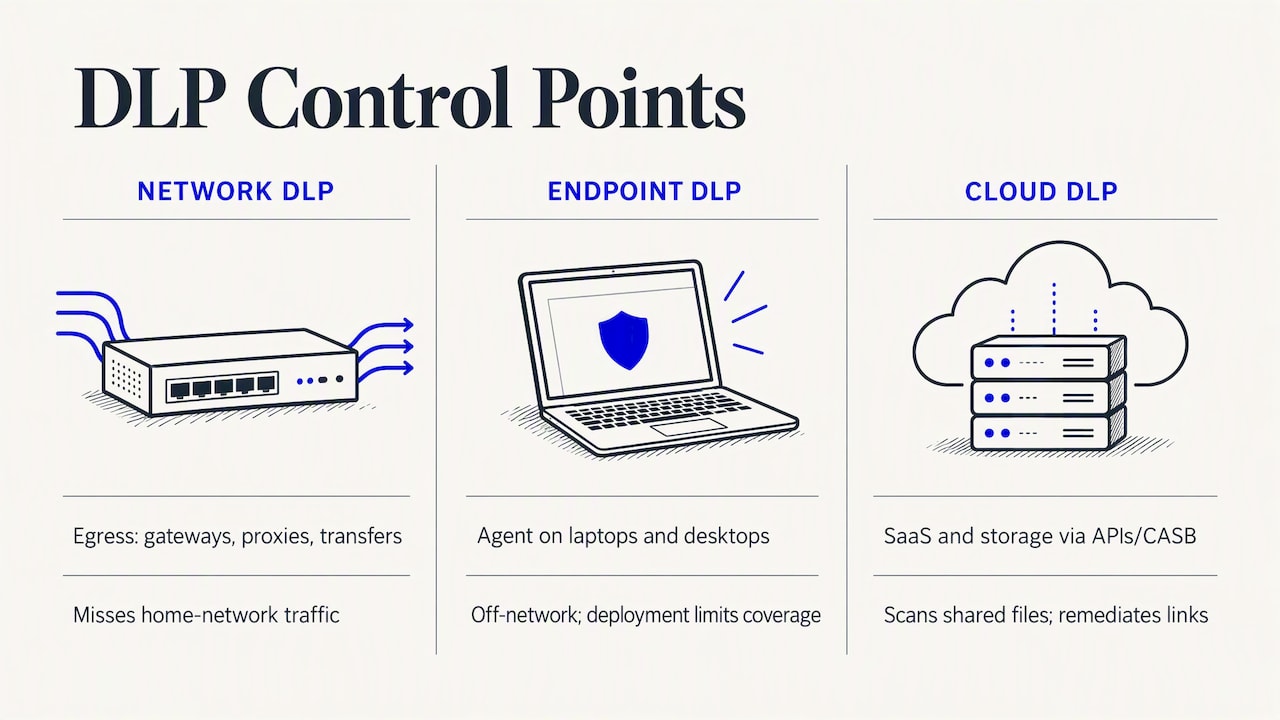
Most programs combine deployment styles, then add complementary data-centric tools.
Network DLP sits at egress points: email gateways, web proxies and outbound file transfer. It is a good fit for catching sensitive content leaving through mail or web uploads, and it covers every device on the network, managed or not. Its blind spot is traffic that never crosses your network, such as a laptop working from a home connection.
Endpoint DLP uses an agent on laptops and desktops. It can control copying to USB drives, printing, screenshots and uploads from the browser, and it keeps working off the corporate network. That makes it central for remote and multi-location workforces. The trade-off is agent management: coverage is only as good as your deployment. Our guide to endpoint security for a global remote workforce covers the operational side of keeping agents healthy across regions.
Cloud DLP protects SaaS applications and cloud storage, usually through APIs or a cloud access security broker (CASB) approach. It scans files in shared drives, flags overly permissive sharing links and can remediate them automatically. Because misconfigured storage is a leading source of exposure, it pairs naturally with posture work, and our cloud security posture management checklist is a practical companion.
Where DSPM and DRM fit
Two adjacent categories extend DLP rather than replace it. Data security posture management (DSPM) discovers and classifies data across cloud and on-premises stores, so you know what you are protecting before you write rules. Digital rights management (DRM) takes the opposite end of the problem. ICO practitioner guidance notes that DLP loses visibility once a document leaves the organizational perimeter, and recommends pairing it with DRM, because DRM binds usage rights to the file itself and keeps enforcing controls outside corporate paths. That is the core of the DLP versus DRM question: DLP guards the routes you control, DRM protects the file wherever it goes, and the two work best together.
Fraud and abuse prevention in regulated sectors shows the same pattern in practice. Platforms such as Health Code Index’s fraud, waste and abuse prevention features work with sensitive claims data, where leakage and misuse are closely linked problems.
When does DLP work well, and where should you expect gaps?
DLP is strongest where you own the pipes. Mail, web traffic, managed endpoints and sanctioned cloud apps are all places where you can inspect, log and intervene. In those channels, a well-tuned policy catches the careless mistake and the clumsy exfiltration attempt before either becomes an incident.
The gaps appear at the edges. Once data leaves your controlled paths, DLP loses sight of it. A client who receives a sensitive report from you can forward it anywhere, and your policy has no say. Third-party sharing, personal devices and unsanctioned apps all sit partly or fully outside what DLP can see.
Operational problems create gaps too:
- Noisy policies: broad rules generate floods of false positives. Analysts start ignoring alerts, and real events slip through.
- Misclassification: if labels are wrong or missing, rules fire on the wrong content and miss the right content.
- Under-resourced operations: DLP is not a switch you flip. Someone has to triage alerts, tune rules and talk to the business, every week.
- Overbroad blocking: policies that block legitimate work push people to workarounds such as personal email or photographing screens, which is worse than the original risk.
The practical conclusion is layered defense. NCSC recommends combining DLP with controls such as least-privilege access, removable storage restrictions and SIEM for log management and anomaly detection. Each control covers a weakness in another. Encryption limits the damage when a device is lost, access control limits who can reach the data at all, and monitoring spots what slips through. DLP then becomes one dependable part of the system, not a single point of failure you are expected to trust blindly.
How do you design and govern a DLP program?
The most reliable advice is to start small. The SANS white paper on delivering DLP value recommends identifying your most valuable data first and building from early, high-impact wins, balancing people, process and technology rather than leading with tooling. Trying to protect everything on day one is how programs stall.
SANS describes a four-step framework that works well as a roadmap:
- Understand the business. Learn what the organization does, which assets drive revenue and which regulations apply.
- Learn the data. Find where sensitive data lives, how it moves and who uses it.
- Execute the program. Deploy controls on the highest-risk data and channels first, then widen coverage.
- Govern continuously. Review policies, incidents and metrics on a fixed schedule, and adjust.
Stakeholders and ownership
DLP touches too many teams to sit with IT alone. Involve the CTO or head of security, compliance, legal and the business heads who own the data. A bifurcated ownership model tends to work well: the technical team runs the platform, while content owners decide what counts as sensitive and what an acceptable exception looks like. Without an executive sponsor, policy disputes stall and tuning never finishes.
Governance and metrics
Measure what shows the program is working and the team is coping. Useful metrics include mean time to respond (MTTR) to DLP incidents, agent coverage across your device estate, the false-positive rate for each policy, and the number of incidents prevented. SANS also stresses stakeholder-specific metrics: executives want risk reduction, analysts want workload, and compliance wants evidence. Reporting the same number to everyone usually satisfies nobody.
Which technical controls should you pair with DLP?
DLP results improve sharply when the surrounding controls are solid. These are the ones we see matter most:
- Encrypt sensitive data. Use encryption at rest and in transit, and consider column-level encryption or tokenization for the most sensitive fields.
- Enforce least privilege. Give people only the access their role needs, and run a disciplined joiners, movers and leavers (JML) process so access shrinks when roles change.
- Send DLP events to your SIEM or MDR. Correlating a DLP alert with login anomalies or unusual file access turns an ambiguous event into a clear story. Our practical guide to managed SIEM for global teams explains how that correlation works across regions.
- Control endpoints and removable media. Restrict or disable USB storage where possible, and use mobile application management (MAM) or mobile device management (MDM) for bring-your-own-device scenarios.
- Separate administrative access. Keep access controls for the most sensitive records distinct from routine data access, so one compromised administrative account does not expose everything.
NIST’s practice guidance on data confidentiality reflects the same layered thinking, describing an architecture that combines automated sensitivity detection, access controls, encryption, multifactor authentication, policy enforcement and logging.
Pro Tip: Cut false positives at the source: fix classification first, enforce in phases, and write a playbook for your top five alert types so every analyst responds the same way.
Automation helps here. Routine responses, such as notifying a manager about a repeated low-risk violation or auto-revoking a public sharing link, free analysts for the alerts that need judgment. Better classification does more than any rule rewrite, because a policy can only be as accurate as the labels beneath it.
How should you deploy and tune DLP step by step?
Order of operations matters more than product choice. A rollout that follows this sequence avoids most of the pain:
- Discover and classify first. Use DSPM or similar discovery to find where sensitive data sits before you write enforcement rules. You cannot protect what you have not found.
- Run in passive mode. Monitor without blocking for several weeks. These baselines normal behavior and shows which draft policies would have created noise.
- Refine policies from real evidence. Tighten rules that fire too often on harmless activity, and widen those that miss genuine risk.
- Enforce in phases. Start blocking for the highest-risk users and assets, in line with NCSC’s advice to apply the strictest controls where risk is highest, then extend to wider groups.
- Automate and document. Script repeatable actions, keep escalation playbooks current and track MTTR and false-positive trends after each change.
Resist the urge to skip passive mode. Teams that go straight to blocking may end up apologizing to angry colleagues and rolling policies back, which damages trust in the whole program.
How do GDPR and proportionate monitoring affect DLP?
GDPR sets the frame. Its security principle covers integrity and confidentiality, and the NCSC’s security outcomes guidance says you must be able to show appropriate technical and organizational measures are in place, including access control, encryption, monitoring and tested incident response. DLP can supply much of that evidence through its logs and policy records.
Monitoring itself must be proportionate. NCSC advises applying the strictest monitoring to high-risk users and critical assets, and avoiding covert or individual-targeted surveillance. In practice, that means documented policies, clear notice to staff about what is monitored and why, and monitoring scoped to genuine risk rather than everyone, everywhere.
One detail is easy to miss. NCSC security principles warn against overtly labelling records as “sensitive” in ways an attacker or curious insider could discover, and suggest techniques such as column-level encryption instead.
What does a managed-services view add to DLP?
From where I sit, the hardest part of DLP is rarely the technology. It is the week-in, week-out work: triaging alerts, tuning rules and answering the business when a legitimate transfer gets blocked. Multi-location organizations feel this most, because policies, time zones and regulations all multiply.
That is why pairing DLP with managed SIEM, SOC and MDR makes sense to me. Correlating DLP events with wider telemetry turns noisy alerts into prioritized cases, and round-the-clock coverage means a Friday-night exfiltration attempt gets looked at before Monday. The common pitfalls I see are under-staffed alert queues, policies written once and never revisited, and programs that stall when their sponsor moves on. A managed service handles the staffing and scale problem, so your people can focus on deciding what data matters most.
— Shirish
How can Zero Through help you run DLP-aligned controls?
We help you turn DLP policy into daily operations, with the logging, triage and response that make alerts worth acting on. Our managed SIEM services collect and correlate the events your DLP produces, and we cover the following:
- Managed SIEM and SOC: log management, alert triage and policy tuning around the clock.
- IT security audit: a clear view of where your data sits and which controls are missing.
- MDR services: rapid response when an alert turns out to be real.
Current prices are on our website. Contact us to book an audit or discuss a managed service engagement.
This article is general information, not a substitute for advice from a qualified lawyer. Consult a qualified legal professional about your own circumstances before acting on anything here.
FAQ
What is data loss prevention?
Data loss prevention is a set of strategies and technologies that identify, monitor and control sensitive data so it is not disclosed or transmitted without authorization. It covers data in use, in motion and at rest, and combines content inspection with contextual analysis, as the NIST glossary definition describes.
What are the four types of DLP?
Sources group DLP differently. Common deployment types include network, endpoint and cloud DLP. Many teams add data discovery and classification, often called DSPM, to help determine what to protect.
Is DLP outdated?
No, but on its own it is incomplete. DLP loses visibility once data leaves the paths you control, so the ICO recommends pairing it with DRM for persistent protection. Used as one layer among several, it remains a core control.
What are the DLP rules in Office 365?
DLP policies are rules that detect sensitive content, such as card numbers or personal identifiers, and apply actions like warning, logging or blocking a share. Exact rule names and options depend on your licence and tenant settings, so check Microsoft’s current documentation for your plan.
Sources
- GDPR security outcomes | National Cyber Security Centre
- Be a DLP Hero: How to Quickly Deliver Value from Your DLP Program and Set It Up for Future Success White Paper | SANS Institute
- A guide to data security | ICO