A patch management policy defines how an organization finds, tests, approves and deploys software updates across its systems, and the single most important step is documenting scope and assigning clear ownership before anything else. Without a named owner and a defined asset list, even a well written policy stalls. Success looks like measurable severity-based SLAs, a living asset inventory, and a documented process for exceptions that never run open-ended.
TL;DR:
- Use these deadlines: emergency patches within 24 to 72 hours, critical within 7 days, high within 14 to 30 days, and lower risks by the next cycle.
- Rate severity by exploitability, exposure, and data sensitivity; an internet facing medium flaw can outrank a critical issue on an isolated test system.
- Use pilot, broad, and critical system rings; monitor pilots for 24 to 48 hours, verify services after each stage, and prepare rollback before critical deployments.
- Require each exception to document the affected system, reason, safeguards, independent risk approver, and expiry; review end of life system replacement plans quarterly.
- Track patch coverage, remediation time, and open exceptions monthly, with failed patch rates quarterly; revise targets when repeated misses expose staffing or tooling limits.
Table of Contents
- Policy template: purpose, scope, definitions and section checklist
- Roles and responsibilities: assignable RACI items and sign-off points
- Severity classification and remediation SLAs (recommended tiers)
- Testing, deployment rings and rollback (how to stage safely)
- Emergency/out-of-band patching: triggers and compensating controls
- Exceptions and end-of-life systems: formal risk acceptance template
- Measurement and reporting: KPIs and cadence to prove program health
- Best practices and integration: automation, vulnerability management and content staging
- Publisher perspective: 90-day rollout checklist and how managed services support execution
- Common implementation pitfalls and how to avoid them
- FAQ
- Sources
- Authoritative templates, standards and guidance to consult
Policy template: purpose, scope, definitions and section checklist
A patch management policy works as a reference document, not a wish list. It needs to tell an auditor, a new hire or a system owner exactly what is covered, who decides what happens, and how exceptions get handled. Institutional policies from universities such as Aberystwyth University and the University of Reading offer a useful starting structure because they were built to survive audits, not just internal review.
Start with a purpose statement that says plainly why the policy exists: to reduce the window of exposure to known vulnerabilities across operating systems, applications, firmware and cloud services. Then write the scope section with the same precision. Vague scope language is the most common reason patch policies fail to hold up under scrutiny.
The scope section should name:
- Operating systems across servers, workstations, and mobile devices, specifying supported versions.
- Applications including third-party software, browsers, and business-critical line-of-business tools.
- Firmware on network devices, endpoints, and specialized hardware.
- Cloud and SaaS platforms, with a note on shared responsibility for patching between the provider and the organization.
- Explicit exclusions, such as air-gapped research systems or vendor-managed appliances, with the reason for exclusion stated.
Scope only means something when it is tied to a living asset inventory. A policy that references “all company systems” without a maintained configuration management database (CMDB) behind it cannot be enforced or audited. Each asset in scope should map to an owner, a patch tier, and a maintenance window, and that mapping needs to update automatically as systems are added or retired. Our attack surface management work with clients consistently finds that CMDB gaps, not missing patches, are the first thing that breaks a patching program.
The policy document itself should include these sections, in roughly this order:
- Purpose and objectives: why the policy exists and what it protects against.
- Scope and asset coverage: the systems, software and exclusions defined above.
- Definitions: severity tiers, deployment rings, and key terms used consistently throughout.
- Roles and responsibilities: who owns, approves, deploys and reviews.
- Severity classification and SLAs: remediation timelines by risk tier.
- Testing and deployment procedure: ring structure, promotion criteria, rollback steps.
- Emergency patching procedure: triggers, approvals, and compensating controls.
- Exception and risk acceptance process: fields required, expiry, re-approval.
- Measurement and reporting: metrics, cadence, and audience.
- Review cycle: how often the policy itself is revisited and by whom.
Name a single policy owner, usually someone in IT security or infrastructure leadership, responsible for keeping the document current. Set a review cadence of at least once a year, and more often if the organization operates across multiple business units with different risk profiles. For organizations with distinct subsidiaries or regional offices, a short annex per business unit works better than trying to force one set of maintenance windows onto every team.
Change control belongs in the policy too, even in summary form. Every patch deployment, outside pre-approved low-risk categories, should go through a change request that references the asset, the patch, the deployment ring and the rollback plan. Maintenance windows should be published in advance and respected by every team, with a documented exception process for anyone who needs to deploy outside them.
Roles and responsibilities: assignable RACI items and sign-off points
A policy without named roles is a set of good intentions. Every patch management policy needs explicit ownership: who writes the policy, who approves and schedules patches, who owns the systems being patched, who can grant exceptions, and who sets risk priorities.
- Policy owner: maintains the document, runs the annual review, and resolves disputes between teams over scope or SLAs.
- Patch administrators: review available patches, schedule deployment windows, apply approved patches, and log every deployment with timestamp, system, and result.
- System and application owners: sign off on maintenance windows for their systems and confirm that a patch has not broken a dependent process before it is marked complete.
- Exception approvers: a named individual or small committee, separate from the patch administrators, who can grant a documented, time-boxed exception when a patch cannot be applied on schedule.
- Security team: sets severity ratings based on exploitability and exposure, and has authority to override standard SLAs when a vulnerability is under active exploitation.
Separation of duties matters more here than in most IT processes. The person requesting a patching exception should never be the same person who approves it. In smaller teams this sometimes means routing exceptions to a manager one level up rather than a peer, but the separation should be written into the policy, not left as an informal habit.
Security’s role deserves its own line because it is often conflated with the patch administrator function. Patch administrators execute; security teams prioritize. When a new vulnerability disclosure lands, security should be the group deciding whether it moves a patch into the emergency track, based on exploitability and whether the affected asset is internet-facing. This split keeps the people applying patches from also deciding how urgent those patches are, which keeps pressure and judgment calls from colliding.
Severity classification and remediation SLAs (recommended tiers)
Every patch needs a severity rating and a corresponding deadline, or the policy has no teeth. A step-by-step guide to building a patch management policy recommends risk-based remediation targets that most organizations can adopt directly or tighten based on their own exposure, as outlined by TechTarget.
| Severity tier | Example criteria | Recommended remediation target |
|---|---|---|
| Emergency | Actively exploited vulnerability, vendor out-of-band release | 24 to 72 hours |
| Critical | High CVSS score, remote code execution, no active exploitation confirmed | 7 days |
| High | Significant privilege escalation or data exposure risk | 14 to 30 days |
| Moderate or low | Limited exploitability, local access required | Next scheduled patch cycle |
A recommended baseline target for critical vulnerabilities is remediation within 7 days of patch availability. That window gives most organizations time to test without leaving a known critical flaw unaddressed for weeks.
Severity should never be assigned by CVSS score alone. A medium-severity flaw on an internet-facing authentication server deserves a tighter deadline than a critical-rated bug on an isolated internal test system. Evaluate exploitability (is there a public proof of concept or active campaign), exposure (internet-facing versus internal-only), and the sensitivity of the data or process the asset touches.
Regulated environments, including financial services and healthcare, often need tighter SLAs than the baseline tiers above, particularly for anything facing the public internet. When communicating these targets to leadership and auditors, frame them as policy commitments with tracked exceptions, not aspirational goals. An SLA that is quietly missed every month is worse than an SLA set one tier looser and consistently met.
Testing, deployment rings and rollback (how to stage safely)
Rolling a patch out to every system at once is how a minor update turns into an outage. A ring-based deployment model limits blast radius and gives teams a chance to catch problems before they spread.
- Pilot ring: a small set of non-critical systems, ideally representing the main OS and application combinations in use, patched first and monitored for 24 to 48 hours.
- Broad ring: the majority of standard endpoints and servers, patched once the pilot ring shows no regressions, typically within a few days of the pilot window closing.
- Critical systems ring: production servers, domain controllers and other high-impact assets, patched last, inside a planned maintenance window with system owner sign-off and a rollback plan ready before deployment starts.
Automated verification should run after each ring: confirm the patch installed, confirm the target service or application restarted cleanly, and confirm monitoring shows normal behavior. Skipping this step is how a “successful” deployment turns into a weekend incident call.
Pro Tip: Keep a rollback script or snapshot ready before you patch any critical-ring system, not after something breaks.
Rollback methods depend on the system: virtual machine snapshots, configuration backups, or vendor-provided uninstall packages. Whatever the method, require the same sign-off for a rollback as for the original deployment, since reverting a security patch reopens the vulnerability it was meant to close and that decision needs the same visibility as the patch itself.
Emergency/out-of-band patching: triggers and compensating controls
Some vulnerabilities cannot wait for the next scheduled cycle. A policy needs a clearly marked emergency path, used only when specific conditions are met, so it does not become the default route for every urgent-sounding request.
Trigger conditions that justify moving a patch out of band include:
- Active exploitation confirmed in the wild against the affected software.
- Vendor out-of-band release, signaling the vendor itself considers the flaw too dangerous to wait for a normal release cycle.
- Internet-facing critical vulnerabilities with a public proof of concept available.
Only the security team lead or the policy owner, not an individual patch administrator, should have authority to invoke the emergency track. That restriction keeps a single urgent-sounding alert from triggering unplanned production changes without proper review.
Emergency patching compresses testing but should not eliminate it. A shortened smoke test on a representative system, combined with compensating controls, is the standard trade-off: network segmentation or isolation of the affected system, temporary firewall rules blocking the exploited port or service, and detection rules tuned to flag exploitation attempts while the patch rolls out.
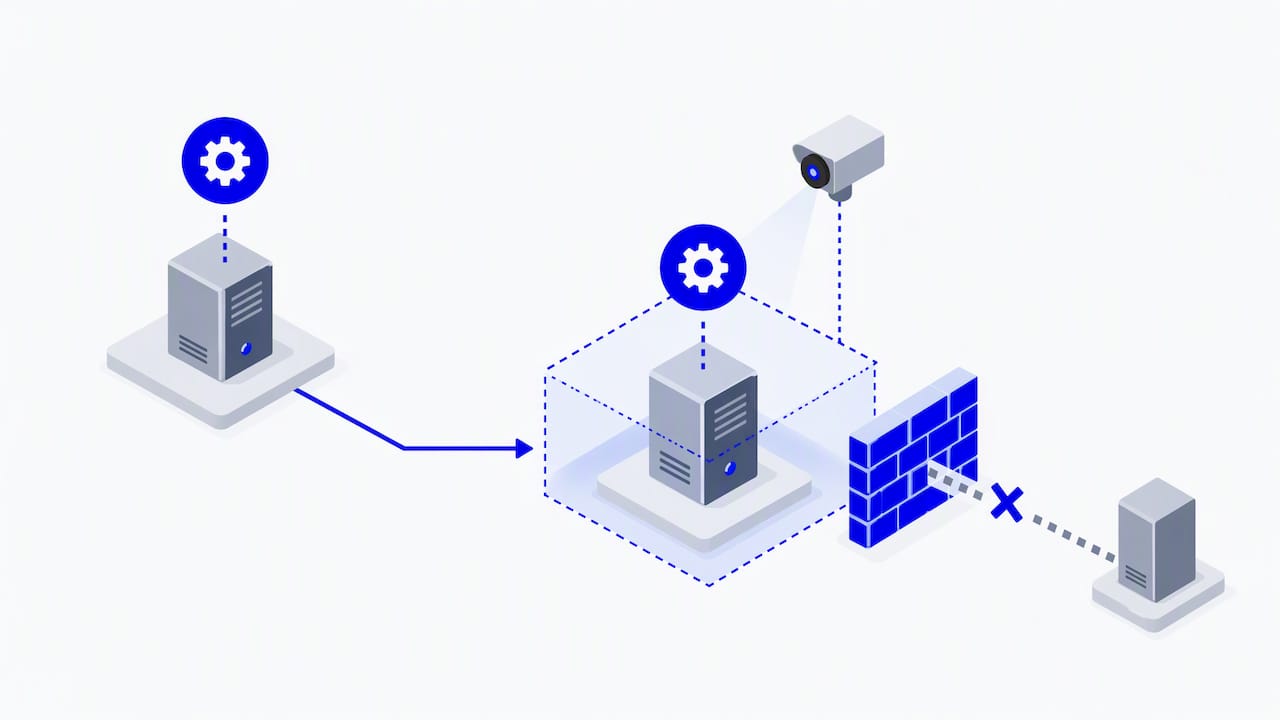
Every emergency deployment needs a short record: what triggered it, who approved it, what compensating controls were in place, and the outcome. A brief post-incident review after each emergency patch, even a short one, tends to surface gaps in monitoring or asset inventory that a scheduled cycle would not reveal.
Exceptions and end-of-life systems: formal risk acceptance template
A patch that cannot be applied on schedule still needs a decision made about it, documented and time-boxed, rather than left silently unpatched. An exception record should include:
- System and patch identifier: exactly what is being deferred.
- Reason for exception: compatibility conflict, vendor dependency, scheduled downtime, or other documented cause.
- Compensating controls: what reduces risk in the meantime, such as network isolation or enhanced monitoring.
- Named risk acceptor: the individual, separate from the person requesting the exception, who formally accepts the residual risk.
- Expiry date: every exception closes automatically unless re-approved.
End-of-life systems deserve their own clause rather than an indefinite exception. If a system can no longer receive vendor patches, the policy should require a remediation plan with a target decommission or replacement date, reviewed on the same cadence as other exceptions, typically quarterly.
For managed service relationships, it helps to include a client-declined patch clause: when a client or business unit explicitly declines a recommended patch against advice, that decision is logged with the same fields above, including the named approver on the client side, so the deferred risk is documented rather than assumed to be an oversight.
Measurement and reporting: KPIs and cadence to prove program health
A patch management policy only proves its value through the metrics it generates. Key metrics should be pulled from the same patch management and asset inventory tooling to avoid conflicting numbers across reports.
| Metric | What it shows | Suggested reporting cadence |
|---|---|---|
| Patch coverage percentage | Share of in-scope assets fully patched against known vulnerabilities | Monthly |
| Mean time to remediate, by severity | Whether SLA targets from the severity table are being met in practice | Monthly |
| Open exceptions and their age | Whether deferred risk is piling up or being actively managed | Monthly |
| Failed patch rate | How often deployments need rollback or rework | Quarterly |
Operations teams benefit from monthly reports that drill into specific systems and overdue patches. Leadership and audit committees need less detail and more trend: a quarterly summary showing whether mean time to remediate is improving, whether exception counts are shrinking, and whether any severity tier is consistently missing its SLA.
The real value of these metrics shows up when they feed back into the policy itself. A severity tier that is missed every quarter usually means the SLA is unrealistic for current staffing and tooling, not that the team is underperforming. Adjust the target or invest in automation, rather than letting the gap sit unaddressed in every report.
Best practices and integration: automation, vulnerability management and content staging
Manual patching does not scale past a handful of systems, and a policy that assumes manual effort at every step will quietly stop being followed. Automate discovery and deployment wherever the risk profile allows it, reserving manual review for critical systems and emergency patches.
- Automate low-risk deployments: standard endpoint patches in the broad ring are good candidates for automated, scheduled rollout with minimal manual gatekeeping.
- Feed vulnerability scan results directly into the patch queue so newly discovered flaws are prioritized against the same severity tiers used elsewhere in the policy, rather than tracked separately. Our work on vulnerability management services covers how this integration typically gets built.
- Keep the CMDB and asset inventory synchronized with actual network discovery, not just manually maintained spreadsheets; our vulnerability assessment guidance touches on why stale inventory undermines every downstream patching decision.
- Use staging or lifecycle environments that mirror production configurations closely enough that pilot-ring results are actually predictive of broad-ring behavior.
- Consider live kernel patching for systems where reboot windows are difficult to schedule, where the underlying platform supports it.
Pro Tip: Before adopting any patch automation tool, confirm it can log deployment results back into your asset inventory automatically, not just into its own dashboard.
Tooling governance deserves a short checklist of its own: confirm the tool supports your full OS and application mix, confirm it integrates with existing vulnerability scanning and ticketing, and confirm someone owns reviewing its automation rules at least annually so stale exclusions do not accumulate unnoticed.
Publisher perspective: 90-day rollout checklist and how managed services support execution
Publishing a policy and enforcing one are different projects. A practical rollout can be organized into stages.
- Days 1 to 30: finalize scope, confirm the asset inventory is accurate, name every role in the RACI, and publish the severity tiers and SLA table.
- Next stage: run the first full patch cycle against the published SLAs, track every miss, and start logging exceptions with expiry dates rather than letting them sit open-ended.
- Final stage: deliver the first monthly metrics report, review which SLAs were missed and why, and adjust targets or staffing before the policy’s first quarterly leadership summary.
Sustaining this past the first quarter is usually where organizations struggle, particularly detecting when a patch fails silently or when an emergency trigger goes unnoticed outside business hours. Managed SIEM and SOC services, paired with ongoing vulnerability management, can support organizations’ security efforts.
Common implementation pitfalls and how to avoid them
The policies that fail often do so for recurring reasons, not for lack of effort. Asset inventory drifts out of date within months of being built, and nobody notices until an audit or an incident forces a manual recount. Requester and approver roles end up held by the same person because splitting them feels like bureaucracy, until the lack of separation becomes the finding in a security review.
Exceptions get granted without an expiry date and quietly become permanent, accumulating risk that nobody is actively tracking. And teams treat a successful patch deployment as the finish line, skipping the post-patch monitoring window that would catch a service that silently failed to restart or a dependent process that broke two days later.
None of these are complicated fixes. They are discipline problems, and the policy document’s job is to make the discipline the path of least resistance rather than something that depends on memory.
— Shirish
FAQ
What is a patch management process?
A patch management process is the ongoing cycle of identifying available patches, assessing their severity, testing them, deploying them in stages, and verifying they applied successfully. It typically runs on a recurring schedule, with a separate expedited track for emergency vulnerabilities.
How often should patch management be performed?
Routine patching generally follows a monthly or biweekly cycle for standard updates, while critical vulnerabilities warrant remediation within about seven days of patch availability. Emergency vulnerabilities under active exploitation are typically addressed within 24 to 72 hours through an out-of-band process.
What should a patch approval process include?
A patch approval process should include a documented request, a named approver separate from the person deploying the patch, a defined testing step, and a scheduled maintenance window with system owner sign-off. Emergency patches follow a shortened version of the same process with senior-level authorization.
What are the best practices for patch management?
Core best practices include maintaining an accurate, automatically updated asset inventory, classifying vulnerabilities by severity and exposure, deploying through staged rings rather than all at once, and integrating patch data with vulnerability scanning results. Organizations that automate low-risk deployments while keeping manual review on critical systems tend to sustain their SLAs more consistently than those relying entirely on manual processes.
How do I handle a system that cannot be patched on schedule?
Log a formal exception that names the system, the reason, the compensating controls in place, and a named risk acceptor, along with an expiry date for re-approval. End-of-life systems that cannot be patched at all need a documented remediation or replacement plan rather than an open-ended exception.
Sources
Authoritative templates, standards and guidance to consult
A few primary sources are worth reading directly when drafting or revising a policy:
- The University of Reading’s patch management policy for a concise institutional template.
- Aberystwyth University’s patch management policy for section structure and scope language.
For broader compliance alignment, ISO 27001 and NCSC vulnerability management guidance remain the standards most commonly referenced alongside institutional policy templates.